How to upscale anime art in 3 steps
- Add the picture. Drop a PNG, JPG or WebP on the box, paste it, or tap to pick it from your gallery. The Type is already set to Drawing on this page.
- Choose 2x or 4x. Use 2x for a wallpaper that is a little too small. Use 4x for a small avatar, an old sprite sheet or a thumbnail you want to print.
- Upscale and download. Press Upscale and watch the progress bar. When it finishes, pick PNG, JPG or WebP and download.
Before and after
Real crops from our open-licensed test set. Before is a plain bicubic enlargement, the kind any resizer gives you. After is the waifu2x model named under each image.
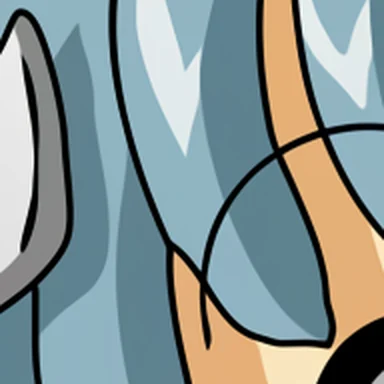
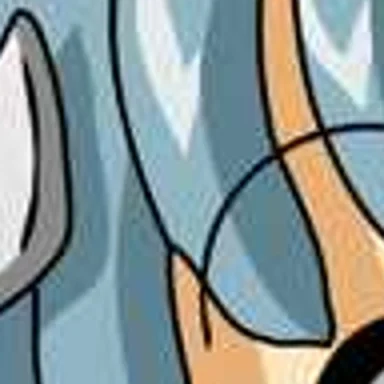 BeforeAfter
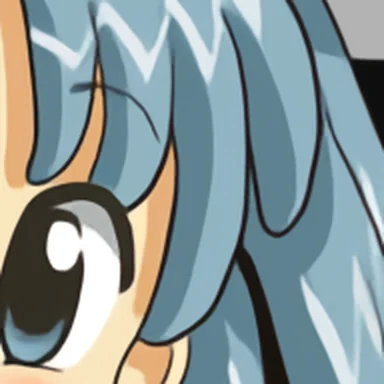
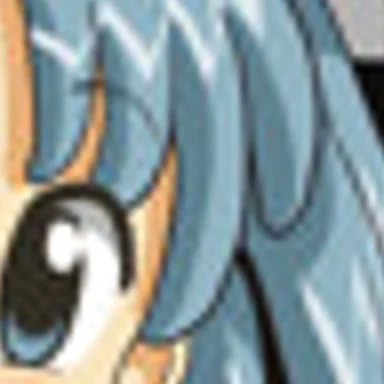 BeforeAfter
 BeforeAfter
The models behind the anime setting
waifu2x was built for anime-style art, and it is still the benchmark other upscalers are measured against.
- 2x uses the newest waifu2x art model, which handles long, thin lines well.
- 4x uses a model made to jump straight to four times the size.
In our test it gave the best results for anime. See How it works.
Noise reduction: when to use it
Clean-up: Auto reads the JPEG compression for you, and PNG gets none. For a PNG from a screenshot, pick Light or Strong.
What people use it for
- Wallpapers. Take a 1920 × 1080 picture to 3840 × 2160 in one step. The 4K page explains the sizes.
- Fanart and avatars. Rescue a small image you saved years ago, or an avatar that looks soft on a big screen.
- Manga and scans. Clean-up on Strong helps pages with paper grain and compression. Our benchmark includes a comic page. For whole pages, see the manga upscaler.
- Stickers, emotes and logos. Transparent PNGs keep their transparent background. The edge is processed with the same model, so you do not get a white halo.
- Game art and old web graphics. Many are low-resolution drawings in an art style close to what waifu2x was trained on.
Honest limitations
- Pixel art. Keep it as pixel art. Use plain 2x, 3x or 4x nearest-neighbor scaling. An AI model rounds the squares and removes the style.
- Screenshots from video. Frames from anime episodes carry compression and motion blur. Expect cleaner lines, not new detail.
- Dithering and halftone. Heavy screentone dots in manga can turn into soft patches. Try Clean-up Strong or Off and compare the results.
- Memory. A 4x enlargement of a big image needs a lot of RAM. If you see an out-of-memory message, use 2x first or a smaller image.
Frequently asked questions
What is the best way to upscale anime pictures for free?
Use a model trained for line art. This page uses waifu2x, which was made for anime-style images. Set Type to Drawing, pick 2x or 4x and check the result. There is no sign-up, no watermark and no limit on how many you do.
Does it work on manga and scanned pages?
Yes. For black-and-white pages with grain, set Clean-up to Strong. It reduces noise and keeps lines clear. Very dense screentone can turn soft, so check the result at 100% before you download.
Can I upscale an anime wallpaper to 4K?
Yes. 2x takes 1920 × 1080 to 3840 × 2160. If the source is smaller than that, use 4x. The result is sharper lines on a bigger canvas. It will not add new details to the background.
Does it keep transparent backgrounds?
Yes. If your PNG or WebP has transparency, the alpha channel is upscaled with the same model and exported in the PNG.
Why does my PNG look the same after 2x?
If the source was already clean and very large, there is little to improve. Try a smaller source, or open the downloaded file at 100% to compare.
Is it better than a normal resize?
For drawings, yes. A normal resize makes lines blurry and keeps JPEG blocks. A super-resolution model redraws the edge smoothly. The examples above are real, uncurated crops.
Does it work for video game sprites and pixel art?
Not well for pixel art. Use nearest-neighbor scaling to keep the squares. For painted sprites and portraits, it works.
Do I need to sign up or pay?
No. It is free, with no account and no watermark. It runs on your device, so we do not pay for servers per image.
Is my fanart uploaded anywhere?
No. The image never leaves your device. Only the model is downloaded, once.
Which clean-up level should I choose?
Auto is right most of the time. Choose Off for clean PNGs, Light for typical JPEGs and Strong for heavily compressed images. Stronger levels remove more noise and also some fine detail.